Friday, 15 May 2015

0 how to add blogspot sitemap in Google webmastertools

The heading of this page canbe

how to add blogspot sitemap in Google .

add sitemap in webmastertools,

how to genrate blogger sitemap,

google site submission,add web site in google,site map genration,Google xml sitemap,xml sitemap etc.


Site map is  structure of your blog it helps for indexing your blog for batter search result  search engines optimise  your blog with  site map and make a structure of your all web page URLs and links .
in this post i show you how to submit a xml site map in google.


Google xml sitemap submission for blogspot .

To Submit our new site into google search engine firstly we need a xml site map that we can create by using online many tools accouding to me the http://ctrlq.org/blogger/ is best web site for creating site map.

Now follow this steps for Google xml sitemap submission .

Create site map :-

1
Copy Your Blogger/Blogsport URL
like    http://easyblogtools.blogspot.in

2
Goto  http://ctrlq.org/blogger/ 
3
Put Your URL and Genrate SiteMap
4

Copy the Genrated code

5

 Goto your blogger disboard and Goto Settings  in Search Performance  Click on Custom robots.txt  Select Enabled and Paste Copied Code  that we copied in step 4.


Note :- Before Going to  step 6 know about how to add your site in google web master tools 
Follow this link Googlesubmissionpart1

How to add a web site in google web Master Tools

6.
Now goto 

Google Webmaster Tools

https://www.google.com/webmasters/tools/

Select your Site  first Click On CRAWL   then Site Map in AddTestSiteMap  


Paste this code and click on Submit

Done.

After 4 to 5 hr  your site to test goto google.com and put your site Title .

if your site showing in search result then your a good Reader.


Thnx For come ..


Published By:
SunnySrn
on 03:36

0 Apple i phone 6 Price Review and full Specification


apple i phone 6 Apply has lunched a new version of iphone series the i phone 6 Plus the super Gadgets, here you can see Apple i phone 6 price review and full specification ,how to buy in india . 

 The Best phone ever.


apple i phone 6 Specification
Apple iPhone 6 key features/specs :
  • 4.7-inch display , Retina HD display technology , 326 ppi
  • iOS 8 and later OS support , Siri , iTunes store access
  • Slimmest iPhone (6.9mm) , premium aluminium built , new design
  • New Apple A8 64-bit processor and Apple M8 motion coprocessor
  • Fingerprint sensor , Barometer
  • 8MP rear camera, Autofocus with Focus Pixels , Optical image stabilization , True Tone flash , 1.2MP front FaceTime camera
  • 4G LTE (with Indian 4G TD band 40 support), Wi-Fi ac , 3G HSPA+ , NFC, Voice over LTE (VoLTE)
Apple iPhone 6 Price in India : Around Rs.45,000 . Coming on 17 Oct 2014 to India .


Full Specifications for Apple iPhone 6

General
SIM Support: Single SIM (nano SIM)
Operating system: iOS 8
Touchscreen: Yes
Processor: Apple A8 processor , Apple M8 motion coprocessor
Network
2G: GSM/EDGE (850, 900, 1800, 1900 MHz)
3G: UMTS/HSPA+ (850, 900,1900, 2100 MHz)
4G: TD-LTE (Bands 38, 39, 40, 41)
Display
Size: 4.7-inch
Resolution: 1334x750 pixels
Type: Multi-touch capacitive
Others: Retina HD display , Display Zoom , Reachability , 326 ppi , IPS , Fingerprint-resistant oleophobic coating on front
Connectivity
GPRS: Yes
EDGE: Yes
3G Speed (Download/Upload): Up to 42 Mbps download
4G Speed (Download/Upload): Up to 100 Mbps download
Wireless LAN: 802.11a/b/g/n/ac Wi‑Fi
GPS: GPS and GLONASS
Bluetooth : Yes , v4.0
Tethering: Yes
NFC Support: Yes
Others: Lightning connector
Camera
Main (Rear) Camera : 8 MP
Flash: Yes
Auto-focus: Yes
Front Camera: 1.2 MP
Video recording : 1080p HD video recording (30 fps or 60 fps)
Other features: iSight camera with 1.5µ pixels, Autofocus with Focus Pixels, ƒ/2.2 aperture, Optical image stabilisation , Continuos video autofocus
Multimedia
Audio Player: AAC, Protected AAC, HE‑AAC, MP3, MP3 VBR, Audible, Apple Lossless, AIFF and WAV
Video Player: H.264,.mp4,mov,MPEG-4 ,.avi
3.5mm audio jack: Yes
Storage
Internal: 16GB/64GB/128GB
Dimensions & Weight
Dimensions (mm): 138.1 x 67 x 6.9 mm
Weight (g): 129 g
Battery
Capacity: Built-in rechargeable lithium-ion battery
Talk time (max) : Up to 14 hours on 3G
Standby time (max): Up to 10 days (250 hours)
Others
Email Support : Yes
Instant Messenger: Yes
Pre-loaded Apps: iMovie,Pages,Keynote,Numbers,iTunes U,GarageBand,Remote,Find My iPhone,Find My Friends
Sensors: Touch ID,Barometer,Three-axis gyro,Accelerometer,Proximity sensor,Ambient light sensor
Physical Keys: Home/Touch ID sensor, Volume up/down, Ring/silent, On/off Sleep/wake
Handset Color Options: Silver, Gold, Space Grey
Inside the Mobile box: iPhone with iOS 8 , Apple EarPods with Remote and Mic, Lightning to USB Cable, USB Power Adapter, Documentation
Others: Fingerprint scanner

Published By:
SunnySrn
on 03:34

0 How To Make Money with Google Adsen 2015

About Post :- I this world every one extra need money so my this post is for those peoples who want to earn some extra money with Internet ,you can earn money by working part time students can also make money with this way its really Genuine way no investment is need but time or attention is need.
here is complete guide.
In this Series We Solve this questions .
  1. Where i Can Start 
  2. What i need to make money on line.
  3. How much i can earn from this way,
  4. How much time we need to work

Make money with Blog Or Web Site 

_______________________________________________________________________________

First of all make any web site or blog To make money on line from your website, you need to first A Blog Or Web Site With  have a decent website traffic. You can learn how to increase your website traffic at tips and suggestions page.Your monthly income or the amount of money you can make from your website is totally dependent on the number of visitors you get monthly for your website.                                         See : How To Create A Free Blog Below are just some ways and suggestions on how you can make money on line. The key of making money from your website is always your website traffic. Once you have a decent amount of traffic for your website, your website is already considered a money website and there are unlimited ways for you to make money from it - by Using  Google Adsen .

Step two is Apply For Google Adsen : 

Now when your ready with your blog with good traffic tehn you need to apply for google adsen that provide you money for showing his ads on your web site the google adsen is the best way to earn money on line it give to high value of your time and eforts  See How To create Google Adsen Account
After when you have a google adsen account then you just post google ads on your site google pay you for showing his sites on your web site or blog .

Make with adsen  From You Tube Videos :

You can make money from the ads shown on your you tube video.you can use this way if you don"t have Time for making web site or blog .youtube is the next way of making money online its also provide good value you can earn some extra money its simple way then making blog you just need to upload videos on various catagaries like educationlan videos,tutorials ,comedy videos ,latest music videos and much more.
.
See How to Montirise videos on youtube

See Also ..


All in one seo plugin for bloger or wordpress
  How to Add blogspot sitemap in Google webmastertools.
  How to Install/Upload a New Template on Blogspot
_________________________________________________________________________________
Thanks For Come:-
our Aim is Provide Only useful information for our Viewers Because They Come here and Spent His Value able Time ,  Advise For Viewers Come Here Again  Get Some More ...

Published By:
SunnySrn
on 03:33

0 search engine optimization service ping your web site for free

About This Post :-   After Posting New Article on Blog if we Don"t Tell  Search Engines about new post , Then we can"t Get Right traffic for our Blog or web site So the This is the more important task After posting your articles on your blog here is a list of some use full web sites that provide all free services like pinging service ,Search Engine Submission ,Back link Gen ration.

  • Ping Your  Article  On All Major Search Engines 
          Pinging helps search engines to telling about your new contents  Blow is site link

  1. Ping pang                    Best one Ping Service 
  2. Google Ping Service   Top Qualty Ping Service
  3. Ping Me                     Top Rink  Ping Service
  4. Ping Clme                   Send over 4500 pings pr day
  5. Mass Url                     Send 25+ qualty pings
  6. Useme                        2,500  + qualty ping service
  7. Ping My Url               1,650 + pings to Url or site 
  8. Mass Ping .in              Mass Ping Service


  • Generate Free Backlinkinks 
      Backlinkinks Helps you to Improve  your site links much links much Traffic and google much trust on your blog or web site 


  • Free Search Engine Submission .
This free Wap sites submit your website or blog on all major search engines link google, bing, yahoo and helps to index your site for best search result .

_________________________________________________________________________________
See Also ..

All in one seo plugin for bloger or wordpress
  How to Add blogspot sitemap in Google webmastertools.
  How to Install/Upload a New Template on Blogspot
_________________________________________________________________________________
Thanks For Come:-
our Aim is Provide Only useful information for our Viewers Because They Come here and Spent His Value able Time ,  Advise For Viewers Come Here Again  Get Some More ...


Published By:
SunnySrn
on 03:32

0 All in one seo plugin for bloger or wordpress

About this post :-This post is about all in one SEO  Tool that we can use for blogsport and word press both this SEO tool helps you to optimise your blog for best search result on google and all other search engines and also provide real USA traffic .
you just need to add  This plugin into your blooger or wordpress blog. How to add widget on blogspot.

______________________________________________________
Features

  • Included meta data .
  • Provide Information about real Auther google+ profile included.
  • Help in Google Indexing.
  • Highly Optimise your bloog for Robotx.
  • Convert Static Page Title to Dynamic .
  • Allow Crawls to Crawls your Site Whenever Any New post
________________________________________________________________________________

Steps :- How to add This Plguin Into Your Blog .
  1. Login into your blogger Account 
  2. Then Goto Your Dashboard.
  3. In Dashboard Click On Template
  4. In Template  Click On Edit Template .
  5. Then Finde <head>  Tag .(you can use Ctrl+ F Key )
  6. After Finding <head> Tag just copy the Given Blog Code and Paste It Just After <head> Tag.
_____________________________________________________________________________
<!-- All in one seo plugin for bloger or wordpress  2014 by cooltricks4u Start here  -->
<b:if cond='data:blog.pageType == &quot;index&quot;'>
<title><data:blog.pageTitle/></title>
<b:else/>
<title><data:blog.pageName/> - <data:blog.title/></title>
</b:if>
<b:if cond='data:blog.metaDescription != &quot;&quot;'>
<meta expr:content='data:blog.metaDescription' name='description'/>
</b:if>
<b:if cond='data:blog.pageType == &quot;archive&quot;'>
<meta content='noindex, nofollow' name='robots'/>
<b:else/>
<b:if cond='data:blog.pageType == &quot;index&quot;'>
<b:if cond='data:blog.url == data:blog.homepageUrl'>
<meta expr:content='data:blog.title' name='keywords'/>
<meta content='index, follow' name='robots'/>
</b:if>
<b:else/>
<b:if cond='data:blog.pageTitle != data:blog.title'>
<meta expr:content='data:blog.pageName' name='keywords'/>
</b:if>
</b:if>
<meta content='global' name='distribution'/>
<meta content='1 days' name='revisit'/>
<meta content='1 days' name='revisit-after'/>
<meta content='document' name='resource-type'/>
<meta content='all' name='audience'/>
<meta content='general' name='rating'/>
<meta content='all' name='robots'/>
<meta content='index, follow' name='robots'/>
<meta content='en-us' name='language'/>
<meta content='USA' name='country'/>
<link href='https://plus.google.com/+sippysrn/about' rel='author'/>
<link href='https://plus.google.com/+sippysrn/posts' rel='publisher'/>
</b:if>
<!-- All in one seo plugin for bloger or wordpress  2014 by cooltricks4u End here  -->
_______________________________________________________________________________
Note :-  Finde +Sippysrn  And Replcae It With Your Google + Profile
_________________________________________________________________________________
See Also :  How to add Bloger Site Map on Google .


Published By:
SunnySrn
on 03:31

0 free seo optimization Starter Guide pdf book

About Post : This post is about a seo pdf book this is veary useful book for beginers it helps you to learn abut Search Engine Optimization  this book is google Search Engine Optimization Starter Guide ,After Reading this book you are able to Give Answers of this question ,

  1. What is Search Engine Optimization .?
  1. How  to optimise my blog for SEO ?
  1. What is OnPage Or Off Page Seo ?
  1. How to Dealing With Crawls ?
  1. How to Improve Your Site Structure 
  1. How to Use SEO For Mobile 
  1. How to Permote Web Site With Righ Way ?
If you read this book with some attantion then its 100% Sure Its Gives You Value of your time .

Download Search Engine Optimization Starter Guide pdf book
________________________________________________________________________________
See Also ..
All in one SEO plugin for bloger or wordpress
  How to Add blogspot sitemap in Google webmastertools.
  How to Install/Upload a New Template on Blogspot
_________________________________________________________________________________
Thanks For Come:-
our Aim is Provide Only useful information for our Viewers Because They Come here and Spent His Value able Time ,  Advise For Viewers Come Here Again  Get Some More ...


Published By:
SunnySrn
on 03:30

0 facebook single name trick 2015

Hello friends today I’m teach you how to crate face-book profile without last name


You just simply follow my instructions.
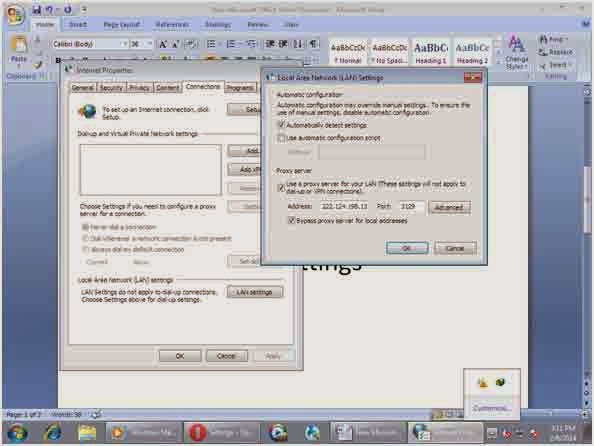
Step 1 First of all open Internet explorer open Internet property
 2 Go to LAN settings
Put the proxy 222.124.198.136 
And port
3129
OK now next step is …..
  1. Open your fb profile
  2. Goto account settings
  3. In account settings go to language settings And select Bahasa Indonesia
FOR VIDEO TUTORIAL  CLICK HERE
just enter your password to verify 
Done after changing name re-select your default language English us.
NOTE : SOME TIME THIS PROXY NOT WORKING THEN TRY THIS ONE.

Any Problem ...?
just comment here.. 

Published By:
SunnySrn
on 03:30

Previous Page Next Page Home

SHARE

Top